Skip to content

This,onAUTO/PILOT.

Live performance software for creative mixing and real-time arrangement. Decks, sequencing, automation, native effects, VSTi support, MIDI output, OSC and more, in one environment shaped around the way you perform.

One-time purchase · no subscription · runs offline

AUTO/PILOT
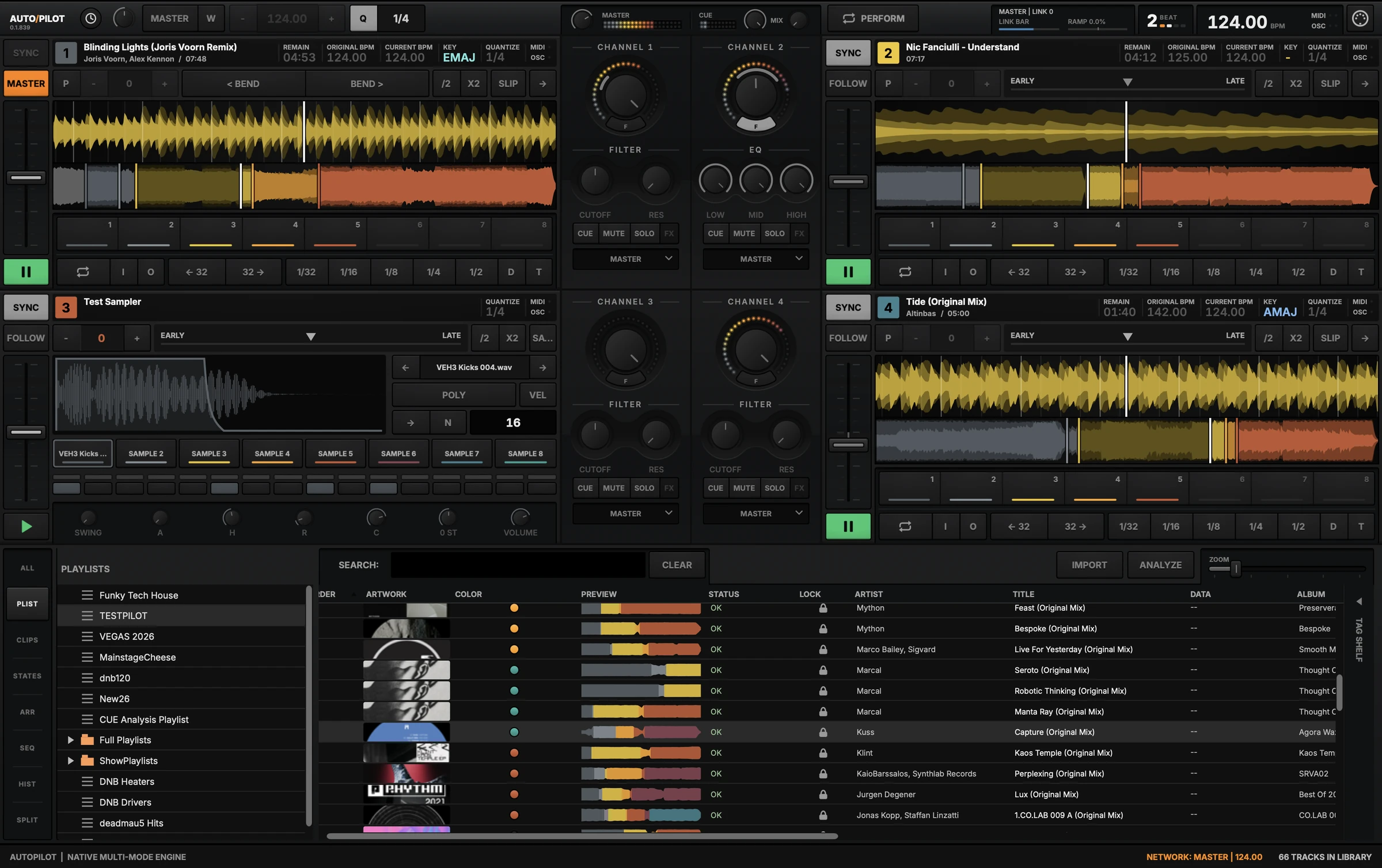
The AUTO/PILOT application: four decks including a sampler, a four-channel mixer with filter and EQ views, and the Browser showing playlists and the track library.

Everything-ish in one environment

  • Four decks
  • Track analysis
  • Sampling
  • Native effects
  • MIDI / OSC
  • Automation
  • Library management
What it does

Decks, sequencer and sampler in one instrument.

Not a controller layer sitting on top of something else. The whole performance environment, built to be played.

Decks

Four decks, and the structure to use them.

Every loaded track is analysed into its sections, so the arrangement is visible under the waveform before you touch it. Eight cue slots per deck, quantised to the grid, with sync and pitch where your hands already expect them.
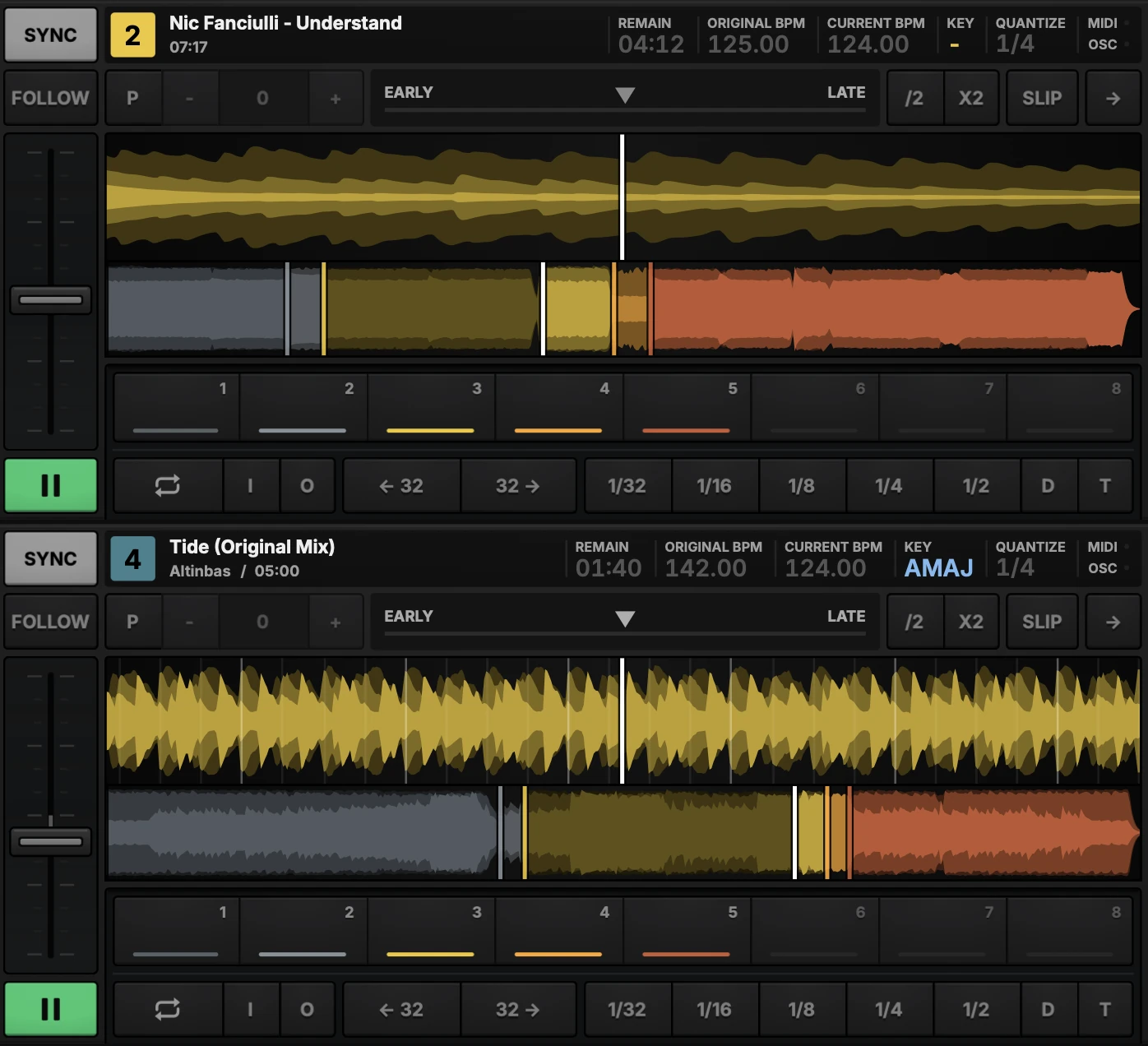
Two AUTO/PILOT decks, each with a zoomed waveform, the whole track coloured by its analysed sections, eight cue slots, and loop and skip keys.
Mixer

Filters and effects on every channel.

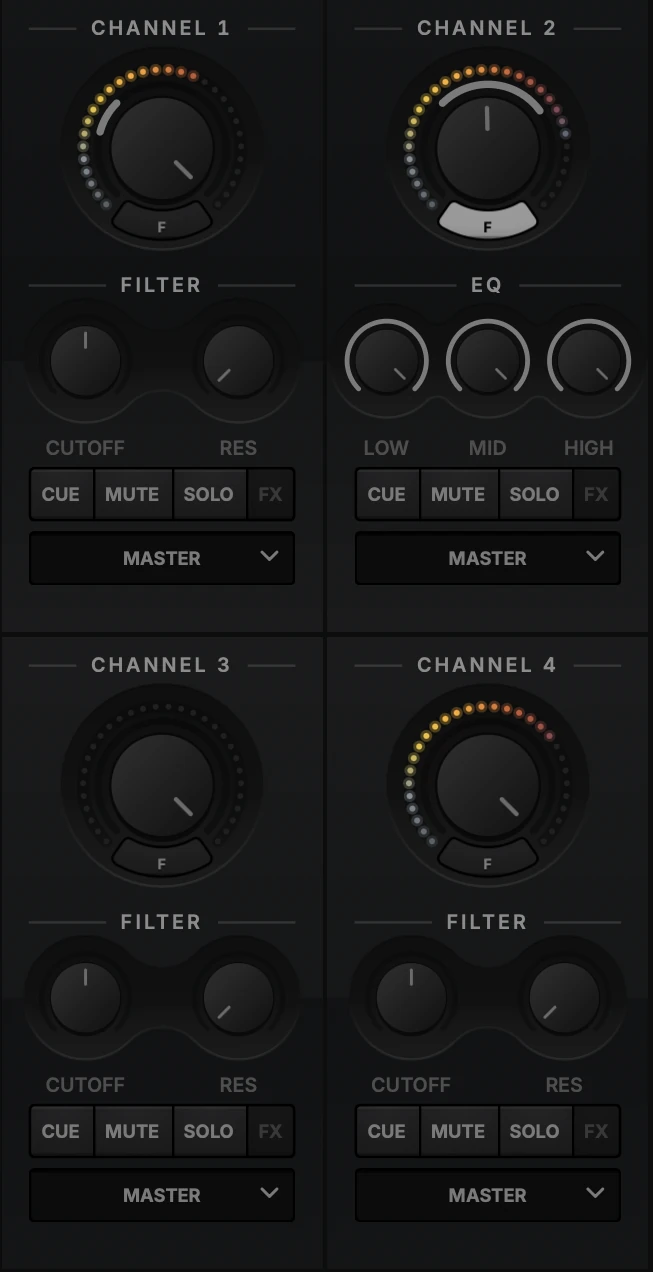
Four channels, each with its own filter, effects send, cue and routing. Native effects that are part of the engine rather than plugins bolted on the side, so they stay predictable when the room is loud and the laptop is hot.

AUTO/PILOT's four mixer channels, each with a volume dial and level meter, filter or EQ knobs, cue, mute, solo and FX keys, and an output selector.
Details that matter at 2am

Made for the room it runs in.

Every one of these exists because something went wrong in a booth once.

Native effects

The effects are part of the engine, not plugins bolted on the side. They behave predictably under load.

MIDI and OSC control

Map the surfaces you already own. Anything you can reach on screen, you can reach from hardware.

Shaped to how you play

Deeply customizable workflows. The layout, the mappings and the signal path all bend to your set, not the other way round.

Nothing phones home

Authenticate once. After that the venue's terrible Wi-Fi is somebody else's problem.

Networking

Play together. Stay in time.

Link a second laptop, a booth machine or a whole rig, and keep Ableton Live and other Link apps on the same beat.

PilotNETNETWORK: MASTER | 124.00

Several machines, one set.

Connect AutoPilot machines on the same network and they play as one rig. One machine holds the clock and every other deck follows it, beat for beat. Hand the clock over with one press, and if the master quits it passes the clock on instead of dropping it.

  • One shared clock across every machine
  • Browse and play another machine's library, streamed with nothing copied
  • Decks numbered across the whole network
Ableton LinkMASTER | LINK 2

In time with everything else.

Link is always on. AutoPilot joins any Link session on your network with nothing to set up, so it stays locked to Ableton Live and any other Link-enabled app on the same tempo and bar.

  • Tempo and bar position shared with every Link peer
  • Joins a running session without resetting it
  • Works alongside PilotNET on the same network
VST3 plugin

AUTO/PILOT, inside your DAW.

An optional VST3 instrument puts the same decks and mixer in your DAW, locked to your session.

Perform it, record it, automate it.

Load AutoPilot on an instrument track and it plays to the host's clock. Each mixer channel comes out on its own stereo pair, so you can record a set stem by stem, put your own processing on any deck, or draw automation for every move.

  • Follows your DAW's tempo and transport, so decks lock to the project grid
  • Four stereo outputs, one per mixer channel, ready to record, process or bounce
  • 155 automatable parameters: play, sync, loops, hot cues, EQ, filter and more
  • The same decks, mixer and interface as the standalone app
Plugin outputsHOST SYNC
  • Mixer 1Out 1 / 2
  • Mixer 2Out 3 / 4
  • Mixer 3Out 5 / 6
  • Mixer 4Out 7 / 8

155 automatable parameters

How licensing works

Buy once. Sign in once. Play offline.

No subscription, no per-show check-in. The app only talks to us on first sign-in and when it checks for updates.

  1. Buy a license

    One payment, no subscription. Install it on the machines you actually play on.

  2. Download and sign in once

    The app authenticates on first launch, then caches a signed offline license.

  3. Play

    No network needed until the next update check. Deactivate a device any time to free its slot.

The honest part

Revocation is eventual.

Freeing a device slot takes effect here immediately, but a machine that is already offline keeps running until its cached license expires or it next comes online. That is the trade for playing without a network, and we would rather say so than surprise you mid-set.

Manage your devices
Pricing

Early access. Full license.

One payment for every feature, with no subscription or add-ons.

Early-access beta
$50one-time

free v1.x updates · no subscription

  • Your laptop, the booth machine and a backup
  • Decks, sequencing, sampling and automation
  • Native effects engine
  • Full MIDI and OSC control
  • Offline licensing after first sign-in
  • macOS and Windows builds

Secure checkout through Stripe.